Free AI Search Content Audit: Find the Angles Your Page Doesn't Answer
What should you improve to get your pages cited in AI search? umoren.ai’s new free tool, AI Search Content Audit, analyzes 4–12 factors from just a question and URL, visualizing vector coverage, content gaps, and ideal text to guide improvements. This article explains how to use the tool and interpret the audit results.
Even if you create articles with the goal of being cited by ChatGPT or Gemini, it can be hard to know what information is missing. To address that challenge, umoren.ai has released a new free tool: AI Search Content Audit.
Simply enter the question you want to target and the URL of an article or service page, one at a time. The tool breaks the question into 4–12 angles and visualizes which sentences on the page are closest to an answer. Its key benefit is that it shows not only the missing angles, but also the direction of the text you should add next.
Try AI Search Content Audit for free (Basic audits are available before registration)
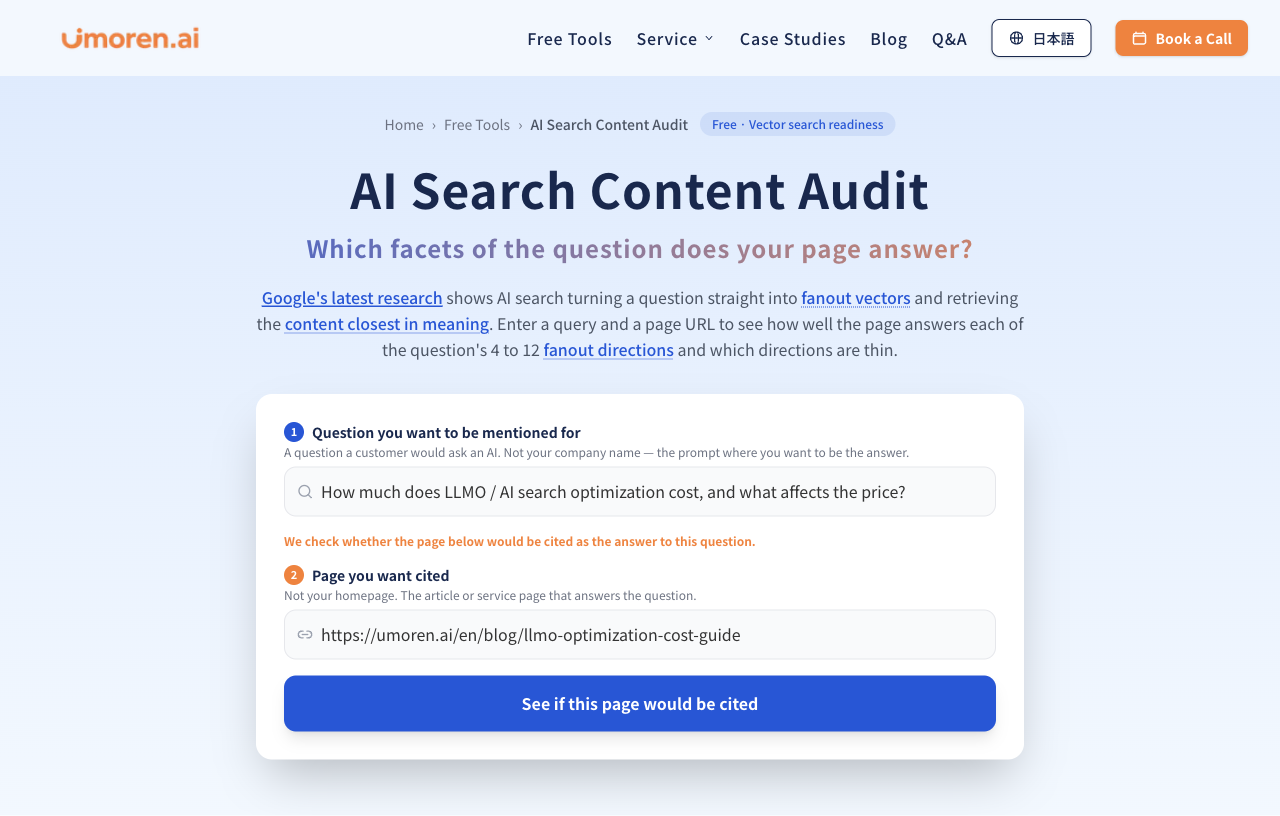
Figure 1 | Audit screen for entering a “question” and the URL of the “page you want cited”
|
What you’ll learn in this article How the tool works / How to read the coverage map and scores / How to rewrite using ideal chunks / How it differs from conventional query fan-out analysis |
Why “which angles you answer” matters in AI search
In traditional SEO, the main goals were optimizing for target keywords and improving search rankings. In AI search, by contrast, a system may identify the necessary points from a user’s question, search for information for each point, and build an answer from them. For example, the question “What is LLMO? How is it different from SEO, and what are the specific steps?” requires separate answers for “the definition of LLMO,” “how it differs from SEO,” “how to create content,” “technical measures,” “trustworthiness,” and “measurement.”
What matters here is not just whether the article contains related keywords. It is whether there is a passage, or chunk, that directly answers each necessary point. If you want to understand the basics of query fan-out, start with how QFO, or query fan-out, works.
For a detailed explanation of how SEO and LLMO are evaluated differently, see the differences between SEO and AI search optimization (LLMO/AIO/GEO).
What is the emerging concept of “fan-out vectors”?
In conventional text fan-out, an LLM creates multiple search queries as text and searches each one. A study by Jiang et al., published in March 2026, proposes a fan-out search method that generates multiple semantic vectors directly from a question instead of generating text subqueries one by one.
In the experiments reported in the paper, the generation time for eight fan-outs was reduced from 1.46 seconds to 0.07 seconds. However, the validation was conducted on fashion and music recommendations, and it has not been confirmed that the same method is running in Google Search or AI Overviews. For details, see the research paper (Jiang et al., arXiv:2603.06397).
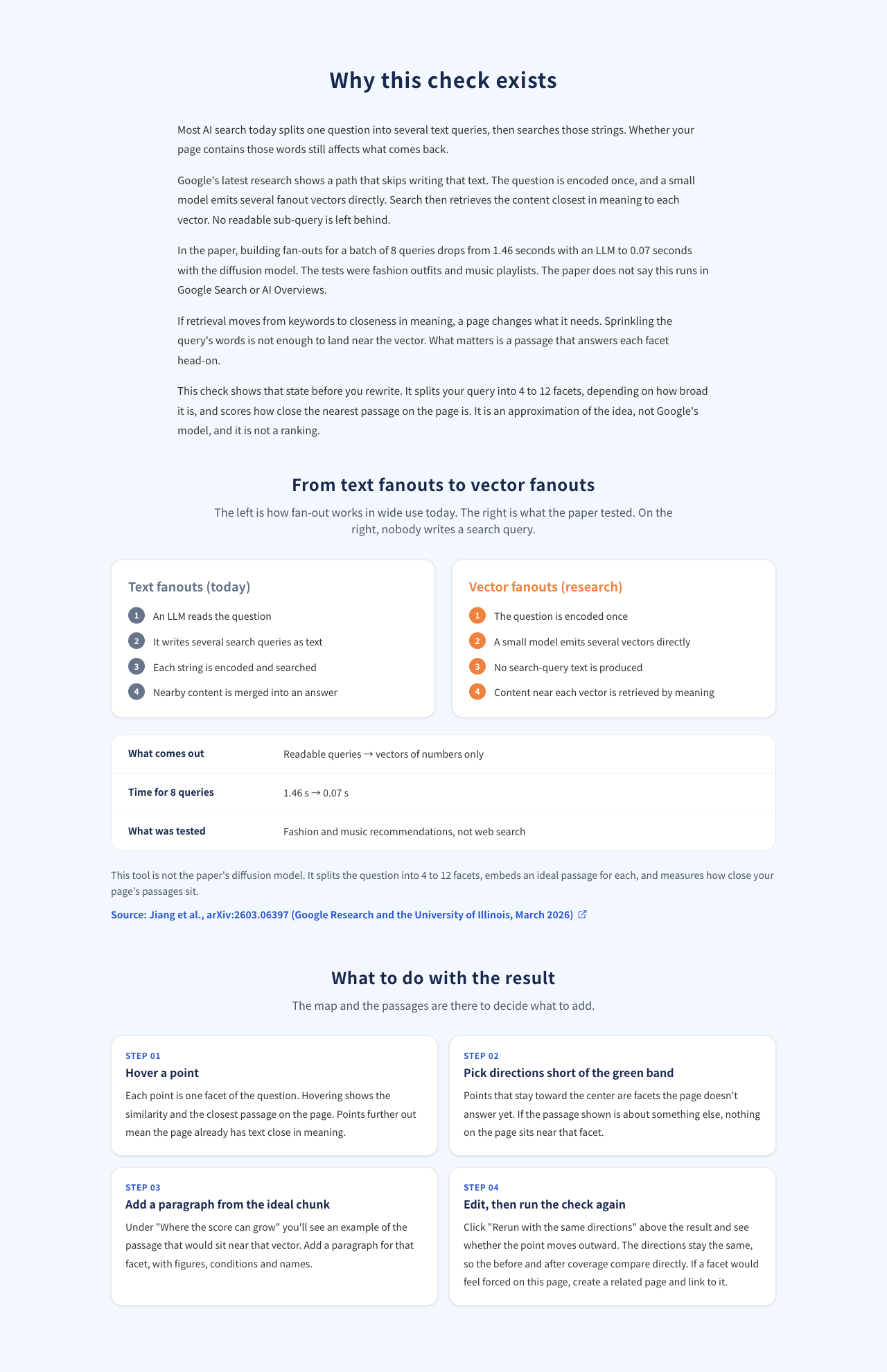
Figure 2 | Difference between text query fan-out and the vector fan-out proposed in the study
AI Search Content Audit is not a tool that reproduces the diffusion model from the paper itself. It is an approximate content audit method that creates 4–12 independent angles and ideal answer examples from a question, vectorizes them, and then measures their semantic similarity to each chunk on your page. The numbers shown are therefore not actual AI citation rates or search rankings.
What you can do with the new free tool
AI Search Content Audit does more than check “what the current page can answer.” It also helps you decide what to improve and compare the page under the same conditions after making changes.
-
Automatically generate 4–12 angles based on the breadth of the question
-
Find the chunk in the page body that is semantically closest to each angle
-
Visualize “covered,” “partly covered,” and “gap” areas in a radar-style coverage map
-
Show “ideal chunks” that can guide additions and rewrites for missing directions
-
Review comparison results by direction and export them to CSV (viewing and exporting all results requires a free unlock process)
-
Compare before and after results after rewriting by selecting “Rerun with the same directions”
How to use it in three steps: start with one question and one page
STEP 1 | Enter the question you want your company to appear in answers for
Write a question that customers are likely to ask an AI. Example: “What is LLMO? How is it different from SEO, and what are the specific steps?” Instead of branded questions that include your company name, we recommend non-branded questions from the comparison and consideration stage.
STEP 2 | Enter the URL of the page that answers that question
Specify an article or service page that directly answers the question, not your homepage. If you enter a URL that has little to do with the topic you want to audit, the numbers alone will not lead to meaningful improvements.
STEP 3 | Read the audit results and choose a direction for improvement
The tool compares the ideal text for each angle with the text on your page using vectors, then summarizes scores, maps, and improvement candidates. A typical processing time is about 20–40 seconds.
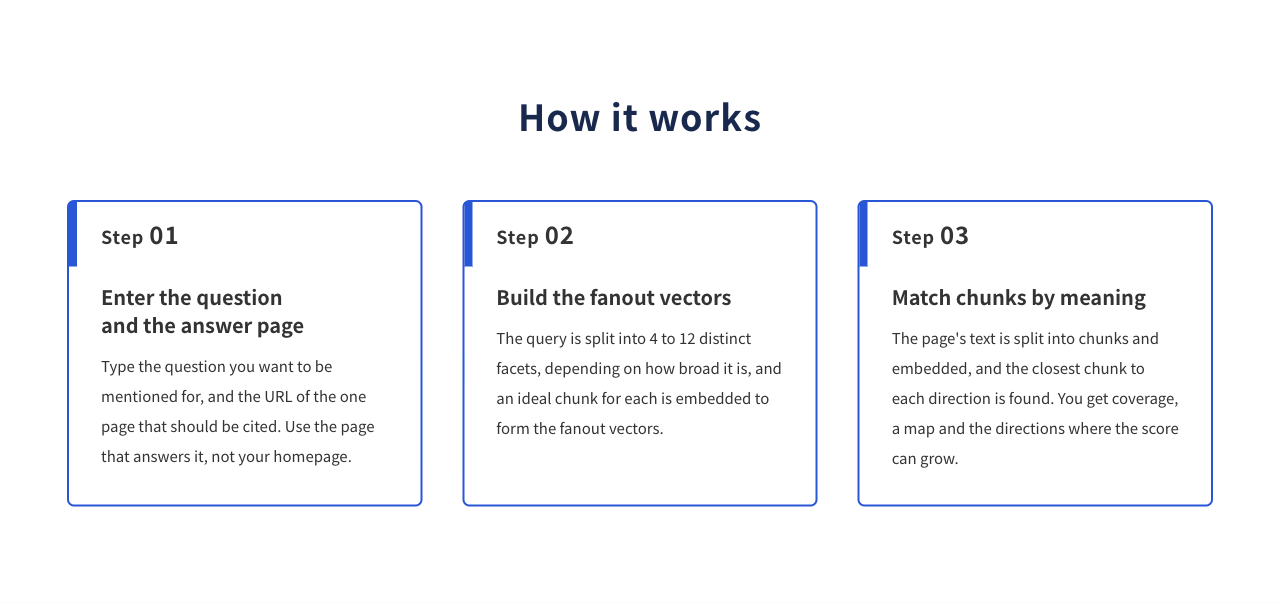
Figure 3 | Basic tool workflow: question and URL input→direction generation→chunk matching
Audit example: how should you interpret a page with a vector coverage score of 84?
Below is an example screen from auditing the “LLMO” article on umoren.ai for the question “What is LLMO? How is it different from SEO, and what are the specific steps?” The result was a vector coverage score of 84/100, 3/6 directions covered, 0 gaps, and fan-out orthogonality of 48/100.
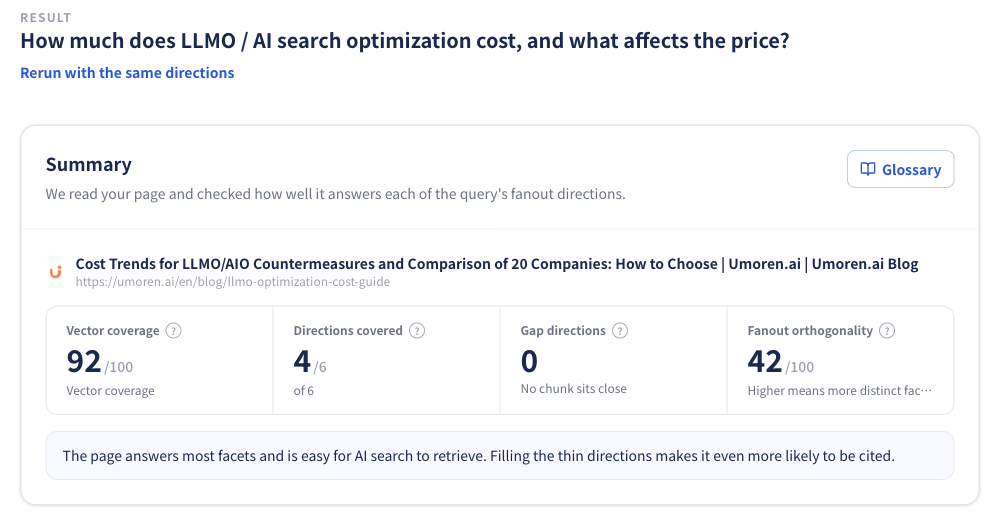
Figure 4 | Audit summary: coverage score of 84/100, covering 3 of 6 directions
“There are zero gaps, so there is nothing to fix” is not always the right conclusion. In this example, three directions are “covered” and the remaining three are “partly covered.” This shows that while the page answers them to some extent, there are still angles where you can add more specificity.
1. Coverage map: identify directions that remain closer to the center
Each axis on the map represents an angle of the question, and the farther a blue point is toward the outside, the more likely it is that the page contains semantically similar text. The green band means covered, the orange band means partly covered, and the area inside them indicates gaps.
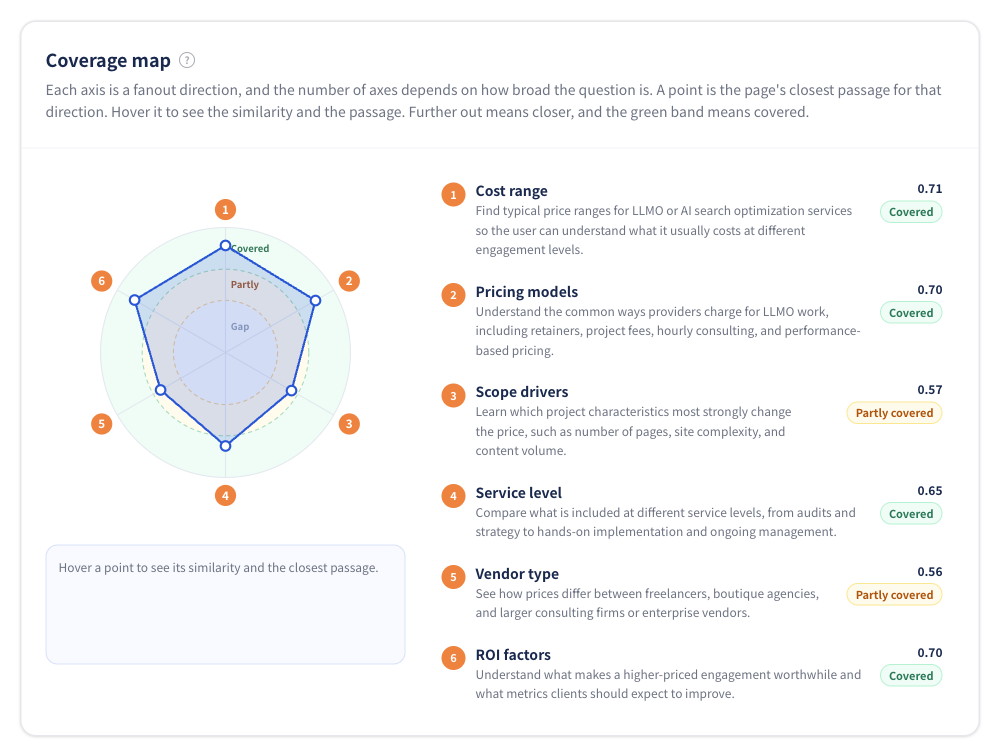
Figure 5 | Coverage map: checking six angles in a radar chart
If you hover over a point, the actual text closest to that direction is displayed. The key is to check the score together with the body text to make sure the selected text is not off-target, even if the number is high.
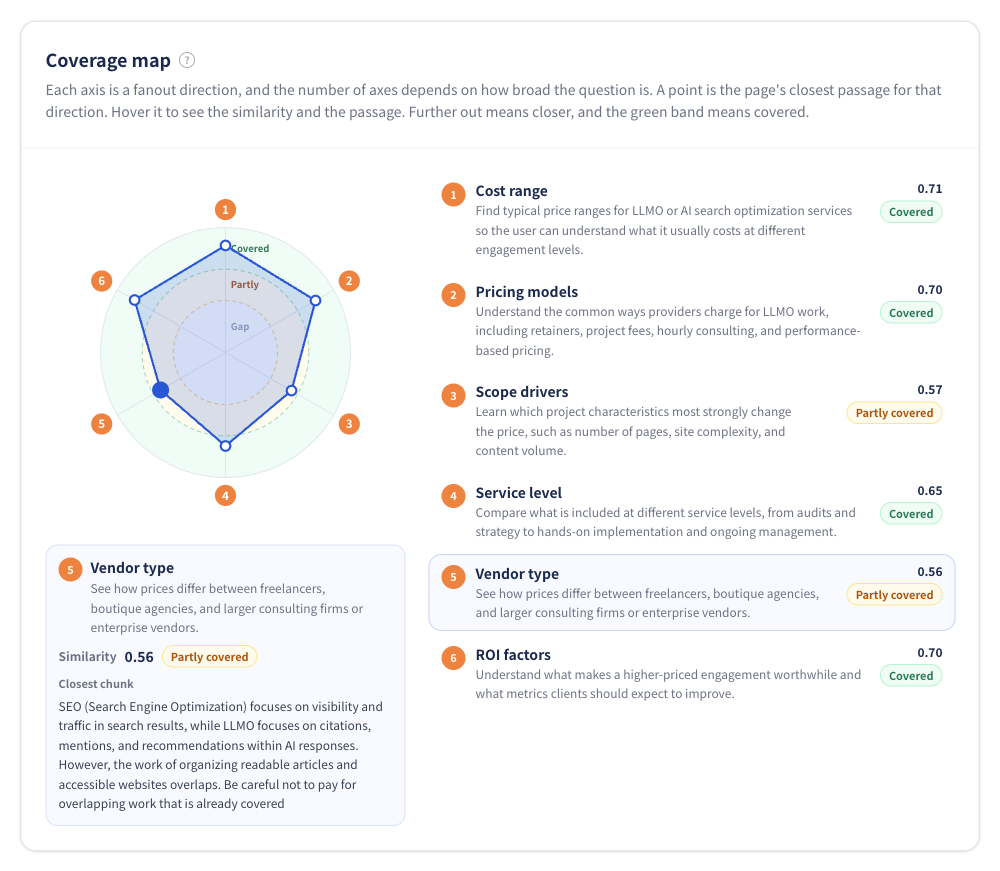
Figure 6 | Selecting a point on the map lets you check the closest body chunk and its similarity score
2. Direction-by-direction fan-out list: organize what is missing
The list shows angles broken down from the question, such as “the definition of LLMO,” “differences from SEO,” “content optimization,” “technical measures,” “strengthening trustworthiness,” and “measurement.” You can consider which sections to add first at the heading level.
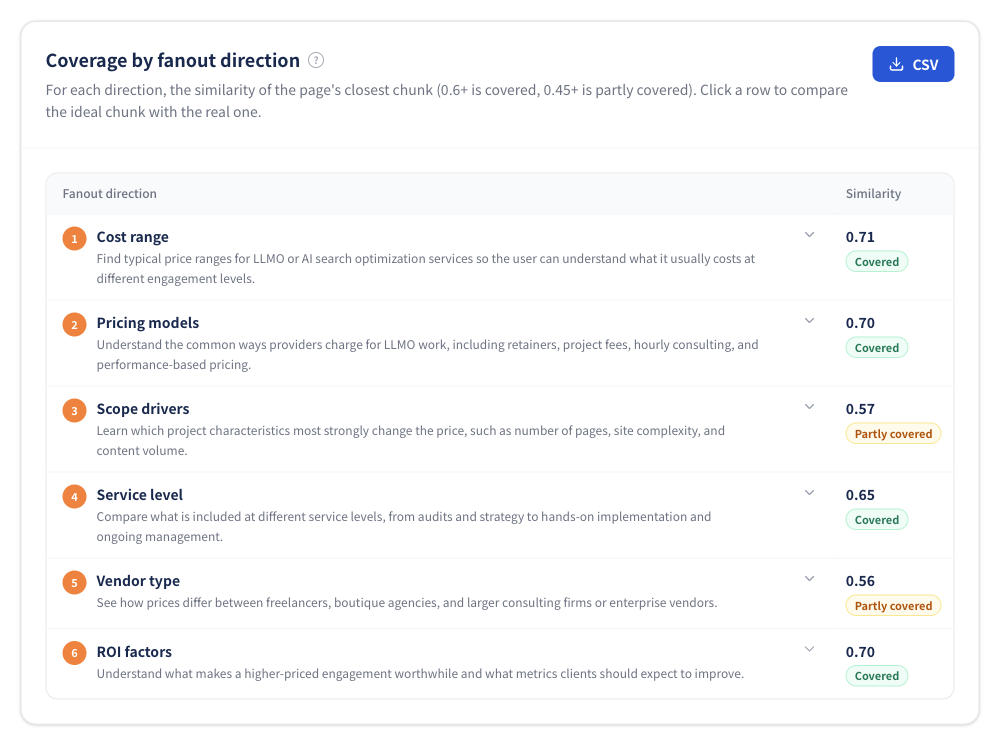
Figure 7 | Coverage by direction: similarity and status for each angle
When you open a row, the ideal chunk appears on the left and the closest chunk on the page appears on the right. By comparing them, you can identify improvement points such as “the text does not directly answer the intent” or “required conditions are missing,” even when they cover the same topic.
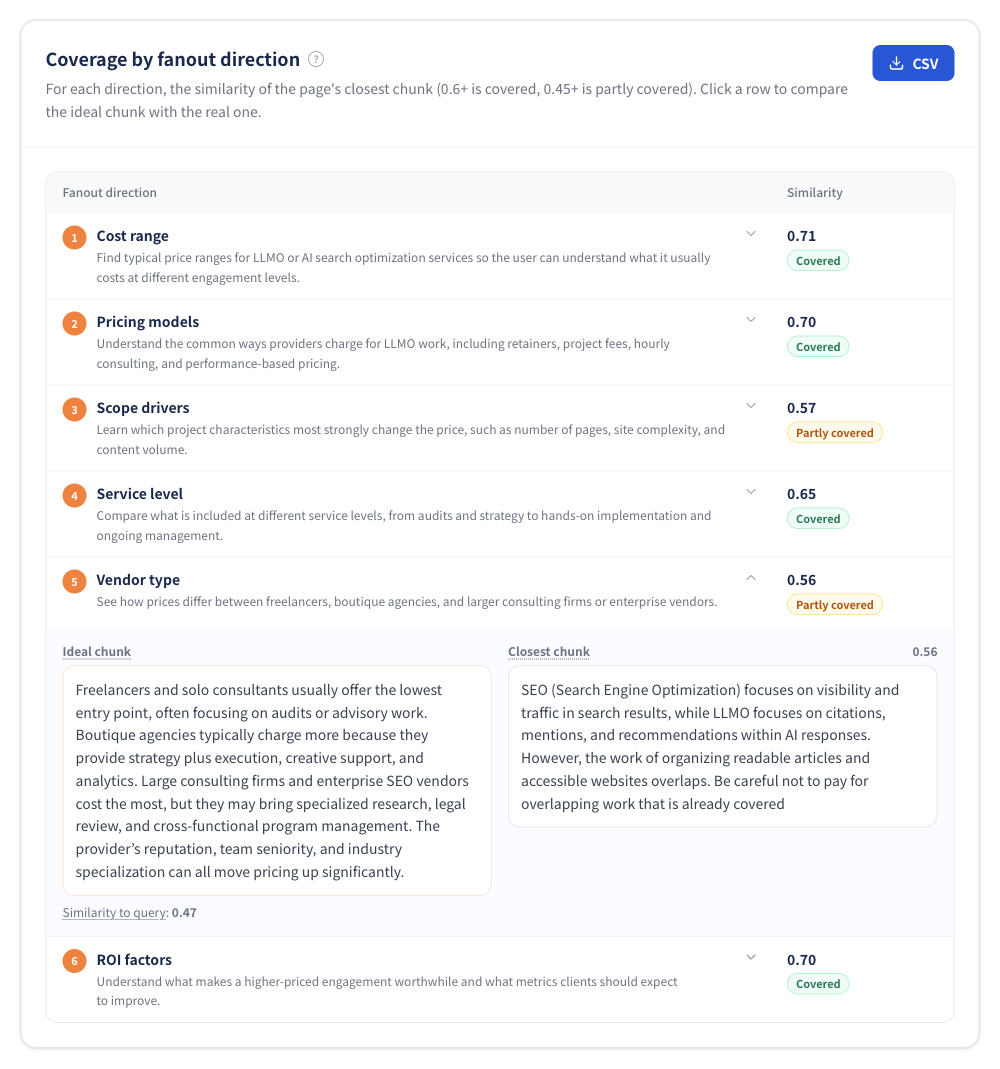
Figure 8 | Comparing the “ideal chunk” and the “actual chunk” side by side
3. Decide what to add based on “Where the score can grow”
Directions that are partly covered or gaps are listed as improvement candidates. In the example screen, three candidates are shown: “technical measures,” “strengthening trustworthiness,” and “content optimization,” with ideal example text shown for each direction.
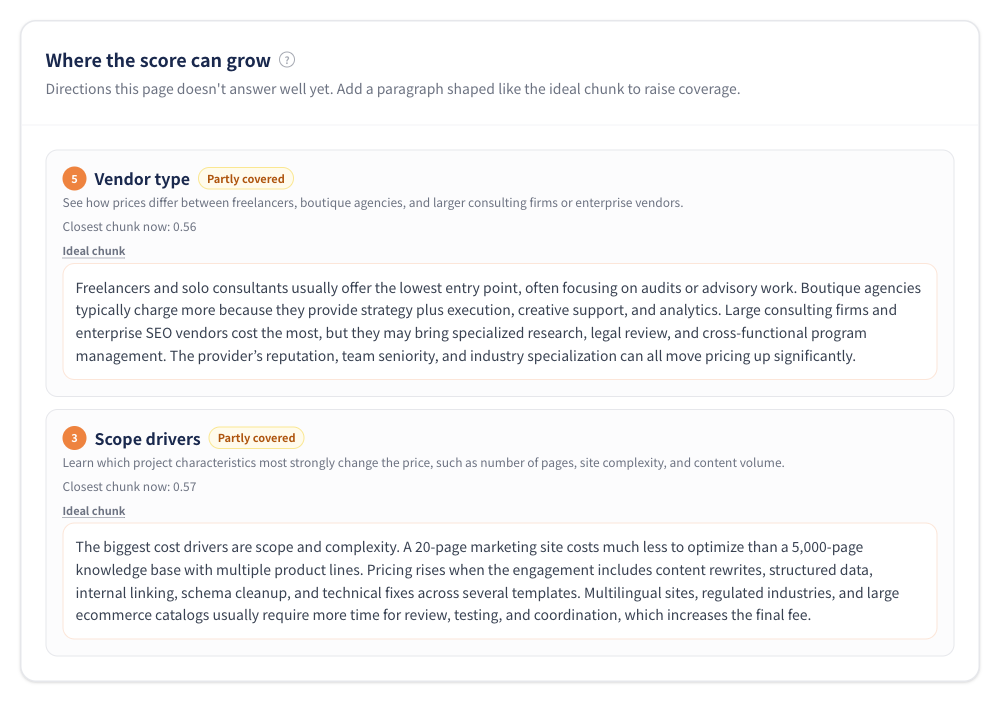
Figure 9 | “Where the score can grow”: listing missing points and ideal chunks
The ideal chunks are not fact-checked text or copy that should be pasted directly into your draft. They are editorial reference examples that show the type of information needed and the structure of the text. Before publishing, verify the accuracy of numbers, performance results, and technical specifications against primary sources or your own company information.
What the scores mean: 0.60 or higher is “covered,” 0.45 or higher is “partly covered”
|
Status |
Similarity |
Editorial interpretation |
|
Covered |
0.60 or higher |
There is body text semantically close to that angle. You can further strengthen examples, conditions, and evidence. |
|
Partly covered |
0.45 or higher and below 0.60 |
There is a related description, but you should add a more direct answer to the question. |
|
Gap |
Below 0.45 |
No text close to that angle was found. Consider adding a new paragraph or a related page. |
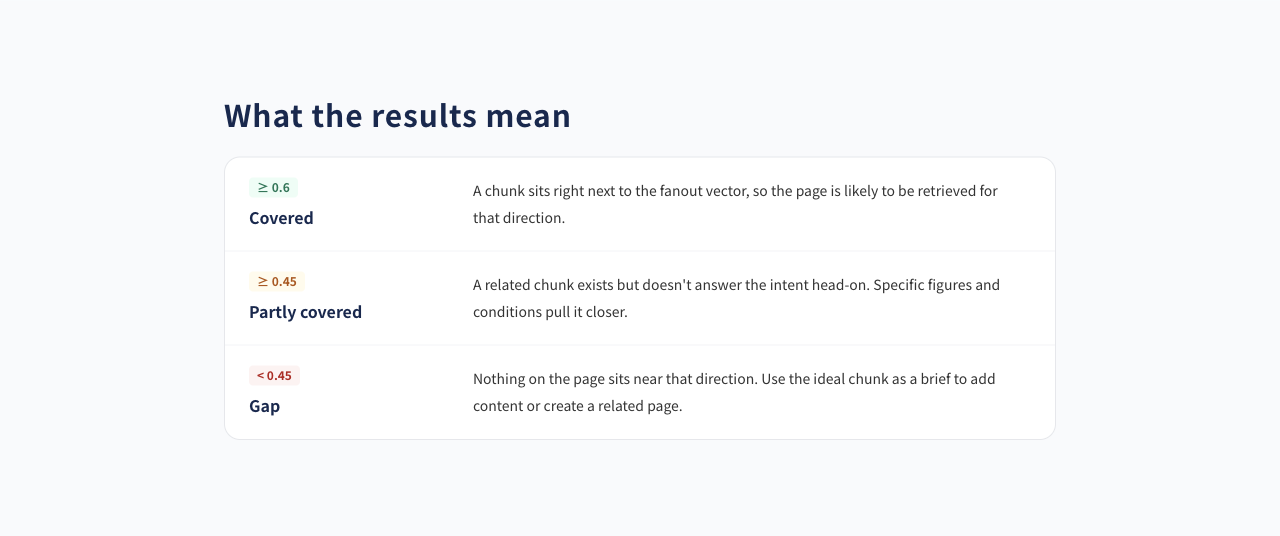
Figure 10 | Criteria for covered, partly covered, and gap
The vector coverage score is an indicator that converts the similarity of the closest chunk for each direction to a 0–100 scale and averages it across all directions. It is not simply the “percentage of covered directions.” It is also not suitable for directly comparing scores between questions with different numbers of directions.
Practical improvement workflow: audit → rewrite → rerun with the same directions
The goal of an audit is not to stare at the score, but to decide what to edit. Start by choosing one direction that has a low score and is also important to the business, then create a section that directly answers that angle.
-
Choose one angle to improve
Example: If “technical measures” is partly covered, check whether the explanation of technical requirements is too abstract.
-
Add a corresponding heading and a direct-answer paragraph
Example: Add an H3 heading such as “Items to check for LLMO technical measures,” then explain, one by one, whether the site can be crawled, whether important pages are displayed in HTML, whether structured data is valid, and whether URLs are consistent. Adding your own implementation examples and verification methods will be more useful than simply listing terms.
-
Check sources, conditions, and freshness before publishing
Avoid fictional numbers or unsupported claims such as “you will definitely be cited,” and add measured values, implementation examples, target conditions, update dates, and similar information as needed.
-
Use “Rerun with the same directions” to compare before and after
Because automatically generated angles may vary slightly each time, the feature that uses the same directions is suitable for comparison. In the re-audit, the previous angles are fixed while the new page body is matched, allowing you to check the change in coverage score.
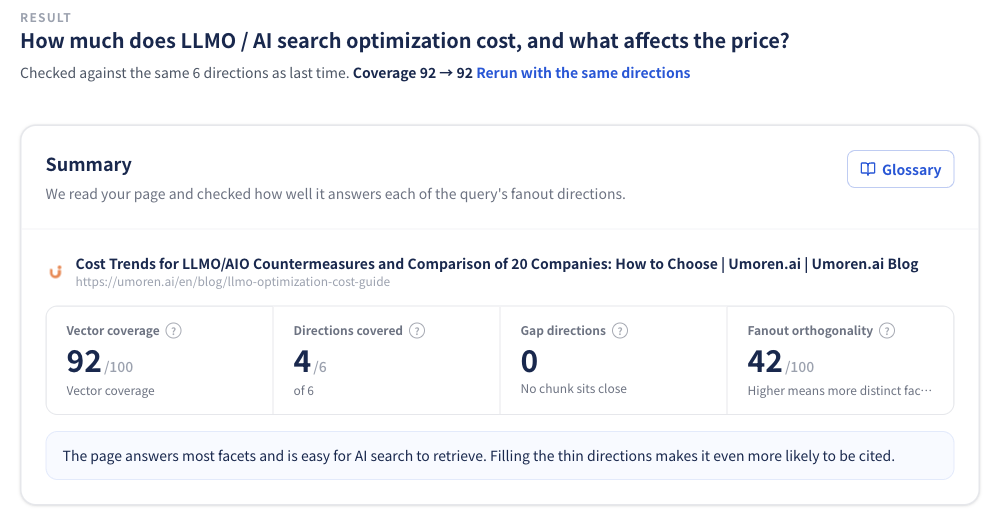
Figure 11 | Re-audit using the same directions and compare coverage score before and after
|
Key point for evaluating improvements Even if the coverage score rises after you add text, that does not guarantee an increase in actual citations or mentions in ChatGPT or Gemini. It is important to treat improved semantic fit and actual visibility in AI answers as separate metrics. |
Should you pack everything into one page? How to think about “orthogonality” and internal links
“Fan-out orthogonality” is an indicator of how different the generated angles are from one another. The higher it is, the more likely the question contains multiple independent points. For example, if you force “pricing,” “technical specifications,” “implementation steps,” “reviews,” and “industry-specific case studies” into a single page, each piece of information may become shallow.
In that case, an effective structure is to answer the question directly in a core article while separating detailed supplementary information into other pages and connecting them with internal links. For example, technical measures can link to an article explaining how RAG and AI search work, while understanding the search process can link to an article introducing query fan-out examples, making it easier for readers to dig deeper into the information they need.
How is this different from the ChatGPT and Gemini QFO analysis tools?
umoren.ai also offers ChatGPT Query Fan-Out Analyzer and Gemini Query Fan-Out Analyzer for free. These tools are designed to observe the search process, including what search queries an AI executed. By contrast, this AI Search Content Audit measures how semantically close the text on one specified page is to each angle of the question.
|
Tool |
Main question |
Best used for |
|
ChatGPT QFO Analyzer |
What search and evaluation process did the AI go through before answering? |
Understanding executed queries, retrieved sources, and evidence/citation processes |
|
Gemini QFO Analyzer |
What did Gemini actually search for? |
Observing search intent and subqueries |
|
AI Search Content Audit |
Which angles are missing from our page? |
Chunk optimization, rewrite prioritization, and before/after comparison |
Use the QFO tools to understand information retrieval in actual AI search, then use this tool to improve your content. Combining these two approaches lets you improve “the angles being searched” and “the angles your page can answer” separately.
Frequently asked questions (FAQ)
Q. Is it really free to use?
Yes. You can run a basic audit as a guest. Displaying all directions in the results, viewing all improvement candidates, exporting CSV files, and similar features require free account registration or a one-time unlock using company information. Please check the tool screen for the latest usage conditions.
Q. How many fan-out directions are generated?
The tool generates 4–12 directions depending on the breadth of the question. As a rough guide, narrow questions generate 4–5, standard explanatory or comparison questions generate 6–8, and broad questions that include multiple conditions such as budget, region, or use case generate 9–12. The more directions there are, the harder it becomes for a single page to answer all of them.
Q. Can it tell me the probability of being cited by AI or my Google ranking?
No. The numbers in this tool are a guideline for the semantic fit of content based on umoren.ai’s own vector matching. They do not represent actual rankings or citation rates in Google Search, AI Overviews, or ChatGPT.
Q. Why can’t the page be loaded?
Possible causes include access restrictions for bots, a setup where the body text is rendered only in JavaScript, or files that are not HTML. During the audit, the tool mainly extracts the body text of articles and service pages, while excluding navigation, footers, and similar elements from evaluation.
Q. Can I compare scores with competitor sites?
This free audit is designed to check one page at a time. If you want to review competitors’ AI citation status together with page-level improvement policies, please use umoren.ai’s AI search optimization consulting.
Summary | Move AI search optimization from “intuitive additions” to “angle-by-angle improvement”
In LLMO, simply increasing the number of articles is not the only answer. When you break down user questions, you can see which angles your existing articles answer well and which angles lack sufficient information. The newly released AI Search Content Audit is a free tool that visualizes the closeness of text by angle and the direction for rewriting based on a question × URL combination.
Start by choosing one question where you want your company to appear as a candidate, then audit the single page that is closest to that question. Once you understand the improvement candidates, you can start updating published content right away.
|
Free tool AI Search Content Audit | Visualize the 4–12 angles of a question and how the text on your page maps to them |
▶ Try AI Search Content Audit for free
If you want to understand why you are less likely to be cited than competitors or want to build an improvement plan with your team, please contact us through a free consultation booking. You can find our other diagnostic tools in the umoren.ai free tools list.
See How AI Search Sees Your Company
Request a free current-state analysis report, delivered within 24 hours