ChatGPT Query Fan-Out Analyzer Update: From Pre-Search Draft to Brand Diagnosis
The ChatGPT Query Fan-Out Analyzer has received a major update. It now visualizes pre-search answers, actual search queries, the relevance of retrieved pages, and brand citations and mentions. Learn how to identify why your company is not being selected in AI search and how to use those insights for LLMO and GEO.
When ChatGPT does not “recommend” your company, where is the issue? Was your content not found in search? Was the page retrieved but not selected? Or was it cited as a source, but your company name did not appear in the final answer?
We have made a major update to umoren.ai’s “ChatGPT Query Fan-Out Analyzer.” In addition to the existing ability to extract the search queries ChatGPT executed, you can now analyze the expected answer before search, the research plan, chunk-level evaluation of retrieved pages, the brand funnel, and the final answer all in one screen.
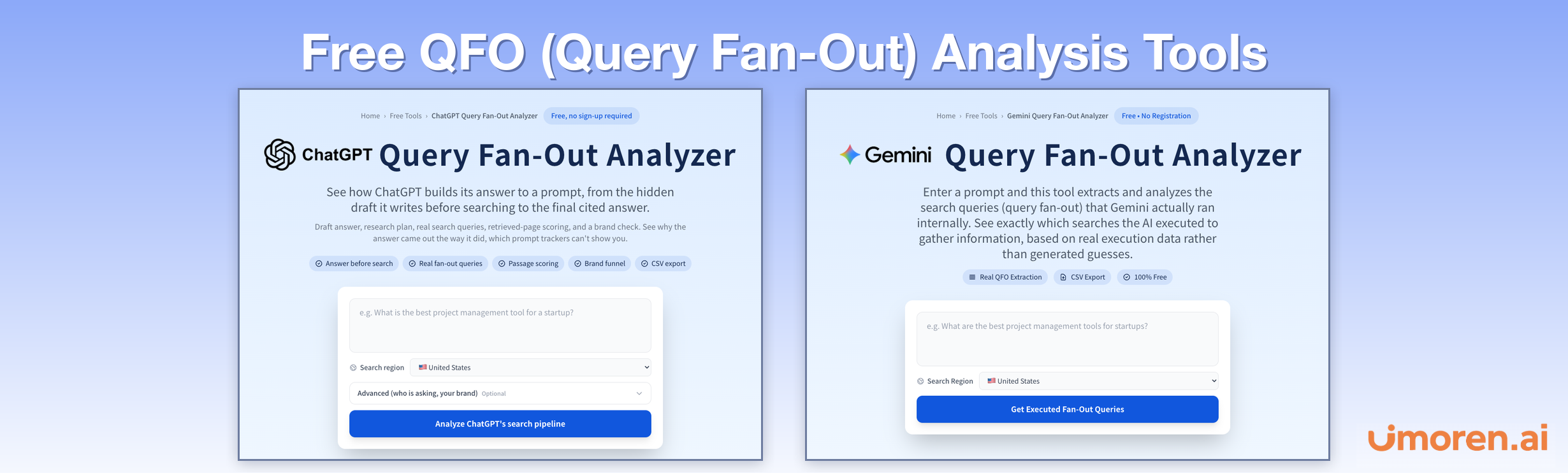
|
What this update lets you do You can now see not only “what searches were run,” but also “what information ChatGPT looked for, which pages were found, and at which stage your brand dropped out of consideration.” |
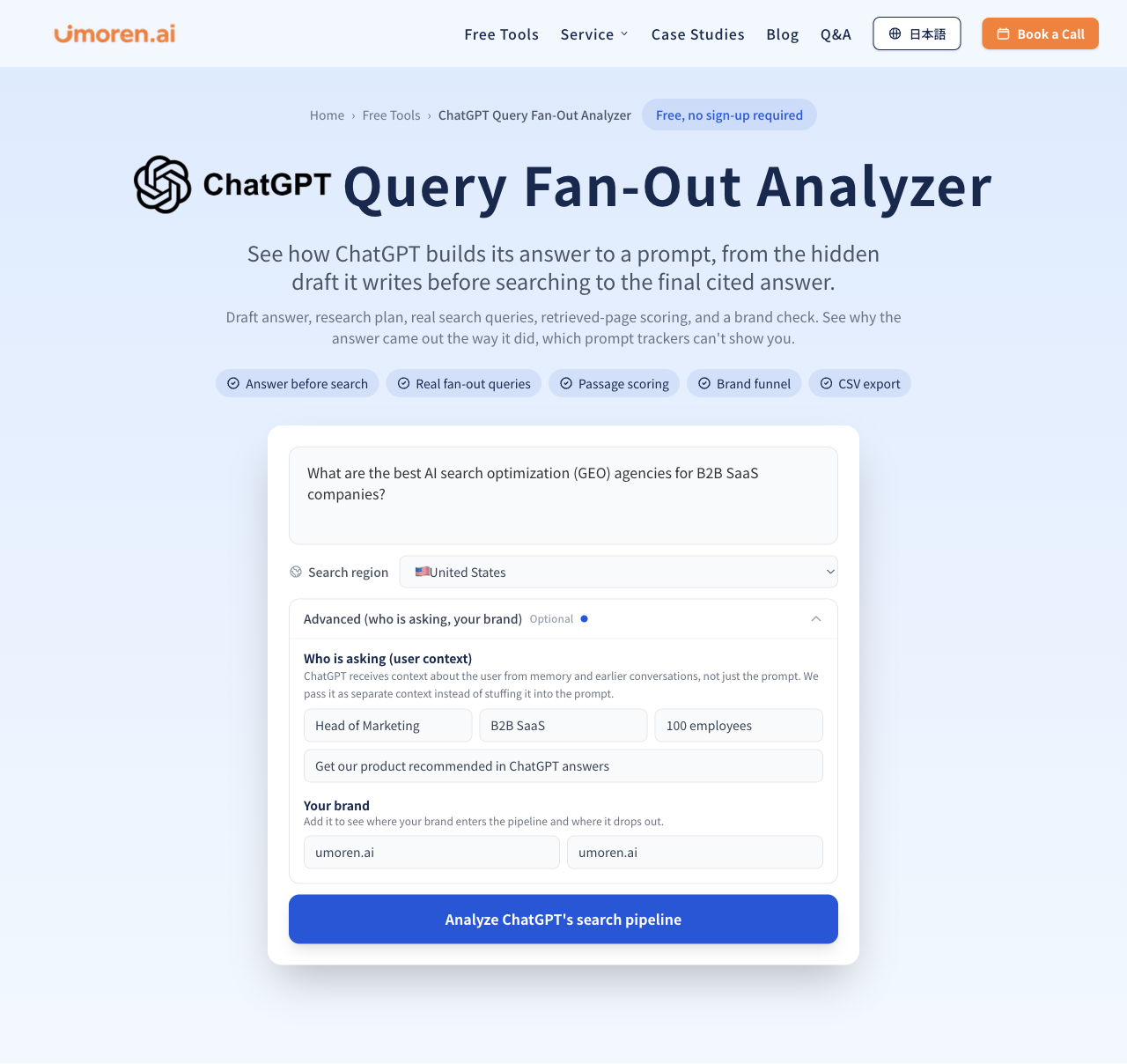
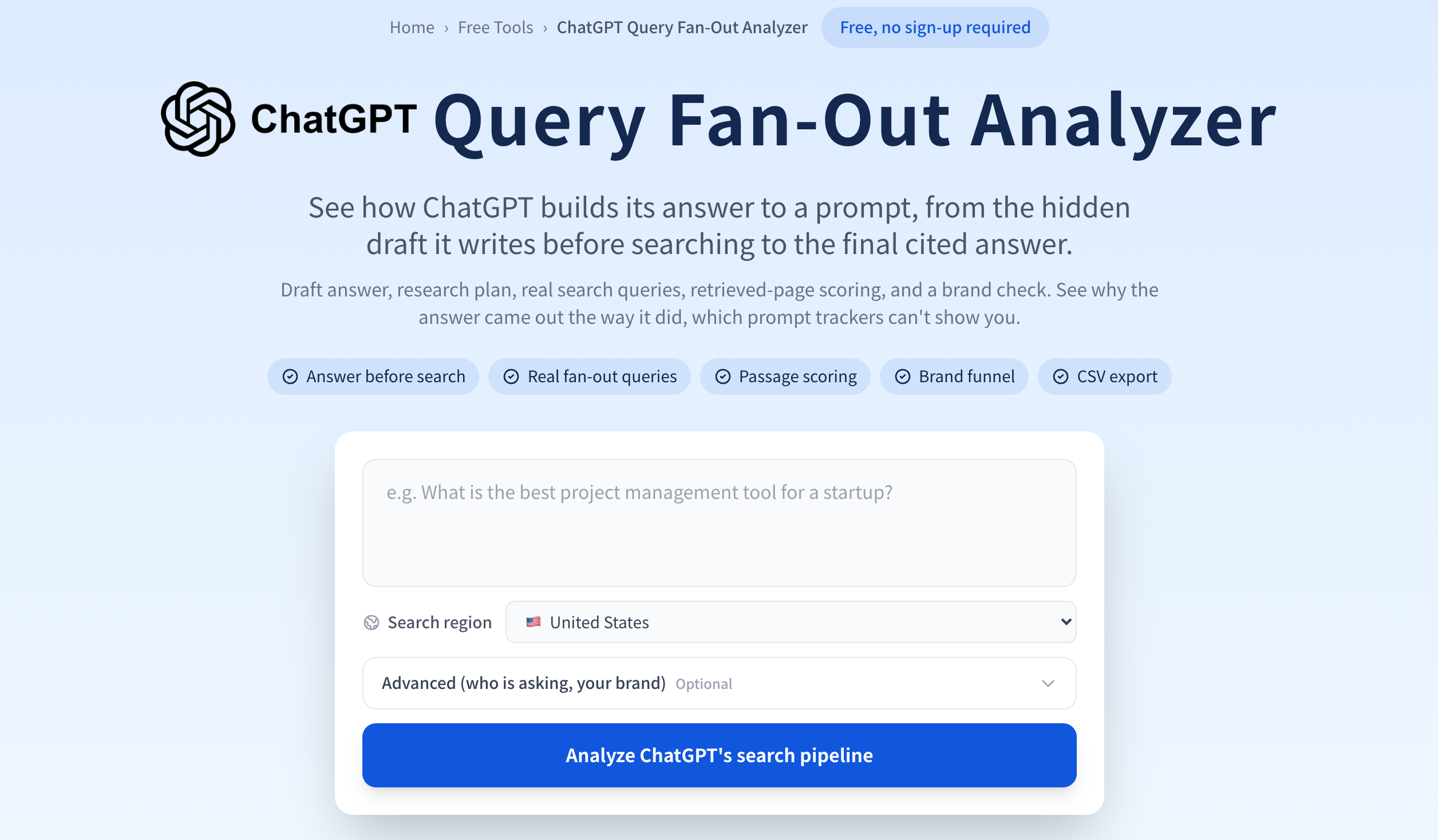
Figure 1 | New analysis screen. In addition to the question and search region, you can optionally specify the user profile and your own brand.
From “understanding search queries” to “analyzing how the answer is constructed”
The previous tool mainly let you check the search terms ChatGPT actually used, the cited sources, and the final answer. But the final answer alone does not identify “why you were not cited.” That is why we expanded the analysis to cover multiple stages of answer generation.
|
Comparison item |
Before the update |
After the update |
|
Analysis scope |
Actual search queries, cited sources, final answer |
From pre-search answer estimation to the final answer |
|
Conditions beyond the question |
Question, search region |
Job title, industry, company size, objective, brand name, domain |
|
Retrieved pages |
Mainly checks cited sources |
Also evaluates pages that were retrieved but not cited |
|
Your brand |
No dedicated diagnosis |
Five-stage funnel and next improvement actions |
|
Search plan |
List of executed queries |
Matches the estimated plan against actual searches |
|
Output |
Query-focused CSV |
CSV that also includes verification targets, match level, page scores, and more |
If you want to review the basics of Query Fan-Out (QFO) first, see our explainer article, “What Is Query Fan-Out?”
AI search answers can be understood in seven stages
The overall analysis flow is: “user and question → pre-search answer → research plan → Evidence target → retrieval and selection → citations and final answer → brand diagnosis.” In the interface, results appear sequentially as the analysis progresses, so you can start reviewing them before all processing is complete.
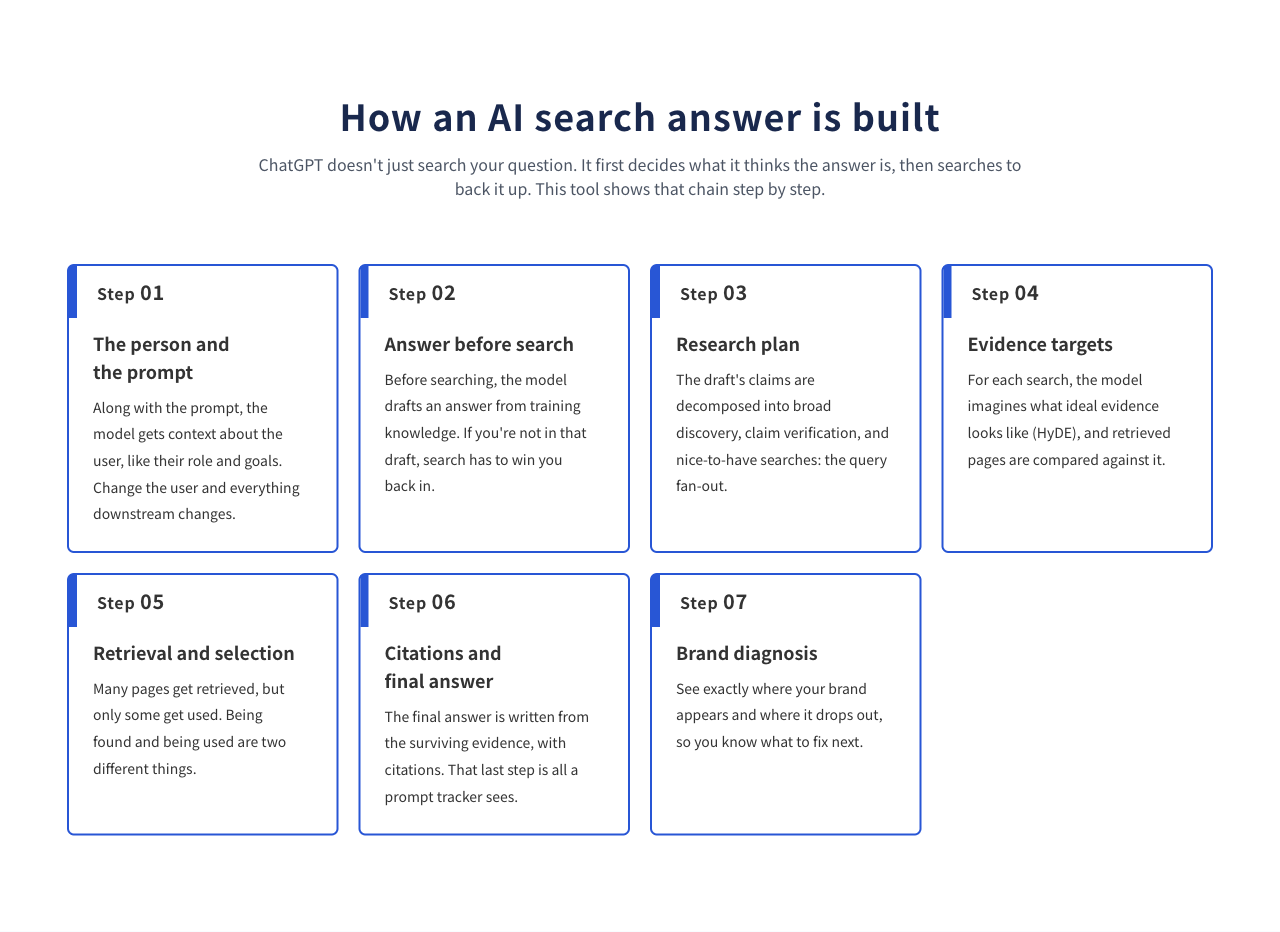
Figure 2 | The seven analysis steps visualized by the tool.
New feature 1: Specify “who is asking,” even for the same question
In the new “Advanced (who is asking, your brand)” panel, you can enter the asking user’s job title, industry, company size, and objective. For example, even with the same question, “What CRM do you recommend?”, a sales director at a 50-employee company and an IT systems manager at a large enterprise will prioritize different criteria. The tool passes this background information as separate context rather than simply appending it to the question text.
In addition, if you enter your brand name and domain, the tool diagnoses whether that brand appeared at each stage of the search process. Relevant areas are highlighted in the interface, so you do not need to search around for brand mentions manually.
New feature 2: Visualize the “pre-search answer” and what needs to be verified
The tool recreates the state before ChatGPT search using a simulation with a separate model. It lists company names, product names, and concepts that appear in the pre-search answer as entities, and extracts “claims that need verification,” such as pricing, comparisons, and track record, with labels such as C1 and C2.
What matters is whether your brand is included among the expected candidates before search. If it is not included, it needs to be discovered and evaluated in the subsequent search. Note that this pre-search answer is not a direct extraction of ChatGPT’s private internal reasoning; it is an estimate generated by a reproduction model.
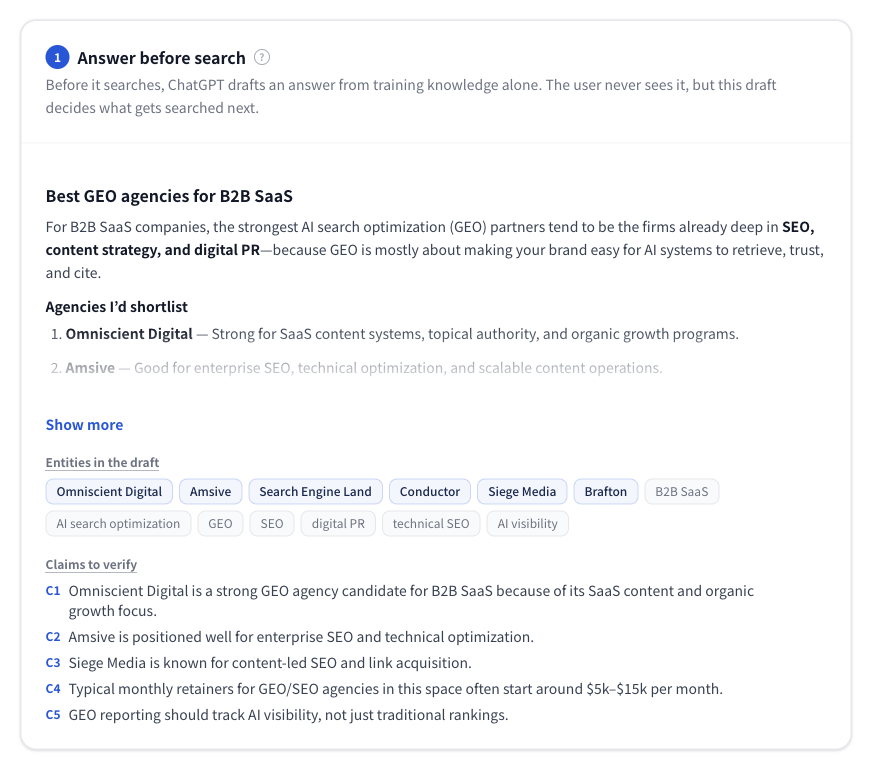
Figure 3 | Pre-search answer. You can review candidate companies, entities, and claims to verify (C1 and onward) in one place.
New feature 3: See why each search is being run in the research plan
The new research plan classifies search candidates into three categories: “broad discovery,” “claim verification,” and “supplemental information.” For each search query, it shows which claim is being checked, what the search is intended to investigate, and what kind of evidence would be ideal.
This “ideal form of evidence” is the Evidence target. It is a hypothetical passage based on the idea of HyDE (Hypothetical Document Embeddings), and it can also be used as a content brief when considering the information structure that AI can easily reference. Prices and figures included in the hypothetical text are not facts, so they should not be copied directly into an article; they must be checked against official information or primary sources.
The tool also matches the estimated search plan against the search queries that actually ran and shows whether semantically similar searches were executed. Because you can see how closely the plan and actual results align, you can evaluate the simulation without confusing it with observed execution results.
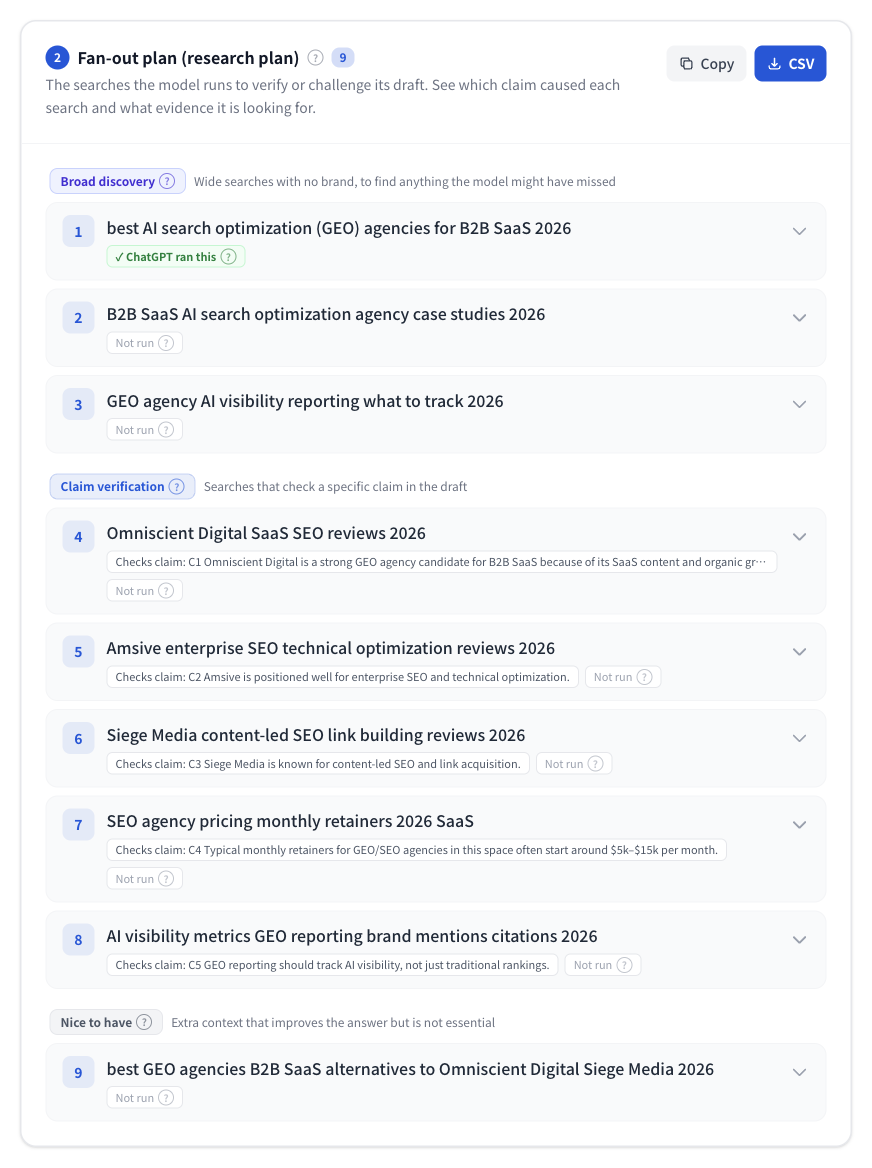
Figure 4 | Research plan. Searches are divided into broad discovery, claim verification, and supplemental information, with matching status against executed searches.
New feature 4: Capture the queries ChatGPT actually searched
You can still use the core existing feature: extracting the queries used in actual ChatGPT web search. If searches were run multiple times, the tool organizes them by round, such as initial research and deeper-dive or branded searches.
New in this update, actual queries that were not included in the prior research plan are labeled “Unplanned.” Unplanned searches can offer clues to unexpected comparison criteria or brand names. If the search operator “site:” was used, you can see that format as-is.
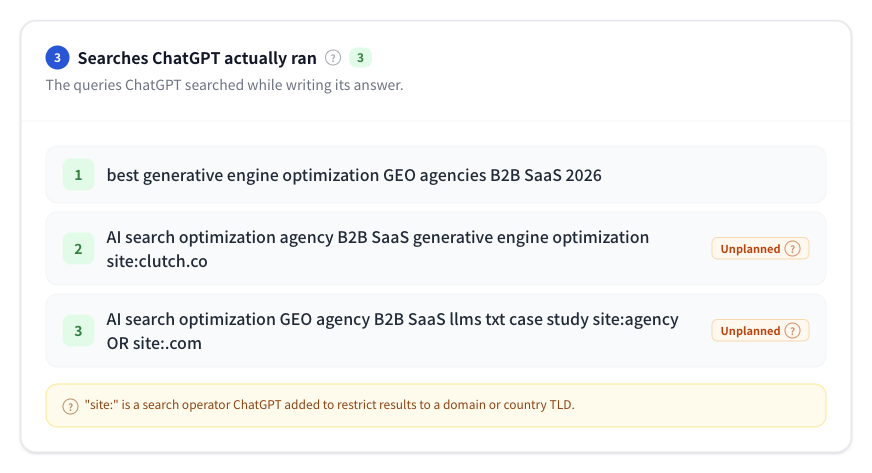
Figure 5 | Search queries actually used by ChatGPT. Supports round-by-round display and “unplanned” labels.
New feature 5: Evaluate “retrieved” and “cited” separately
One especially important part of this update is retrieved page evaluation. Previously, attention tended to focus on pages cited in the final answer, but pages retrieved as search results are not always used as evidence in the final answer. The new screen counts “Retrieved,” “Scored,” and “Cited” pages separately.
The tool divides the body text of retrieved pages into small text units (chunks) and compares each one against the Evidence target to calculate relevance. The relevance shown is a metric calculated by umoren.ai, not the private ranking score ChatGPT used internally. Some pages cannot be evaluated depending on whether the site can be retrieved.
In the example interface, you can see a breakdown such as “Retrieved: 15, Scored: 9, Cited: 5.” You can investigate which search intent each page was close to, including pages that were not cited.
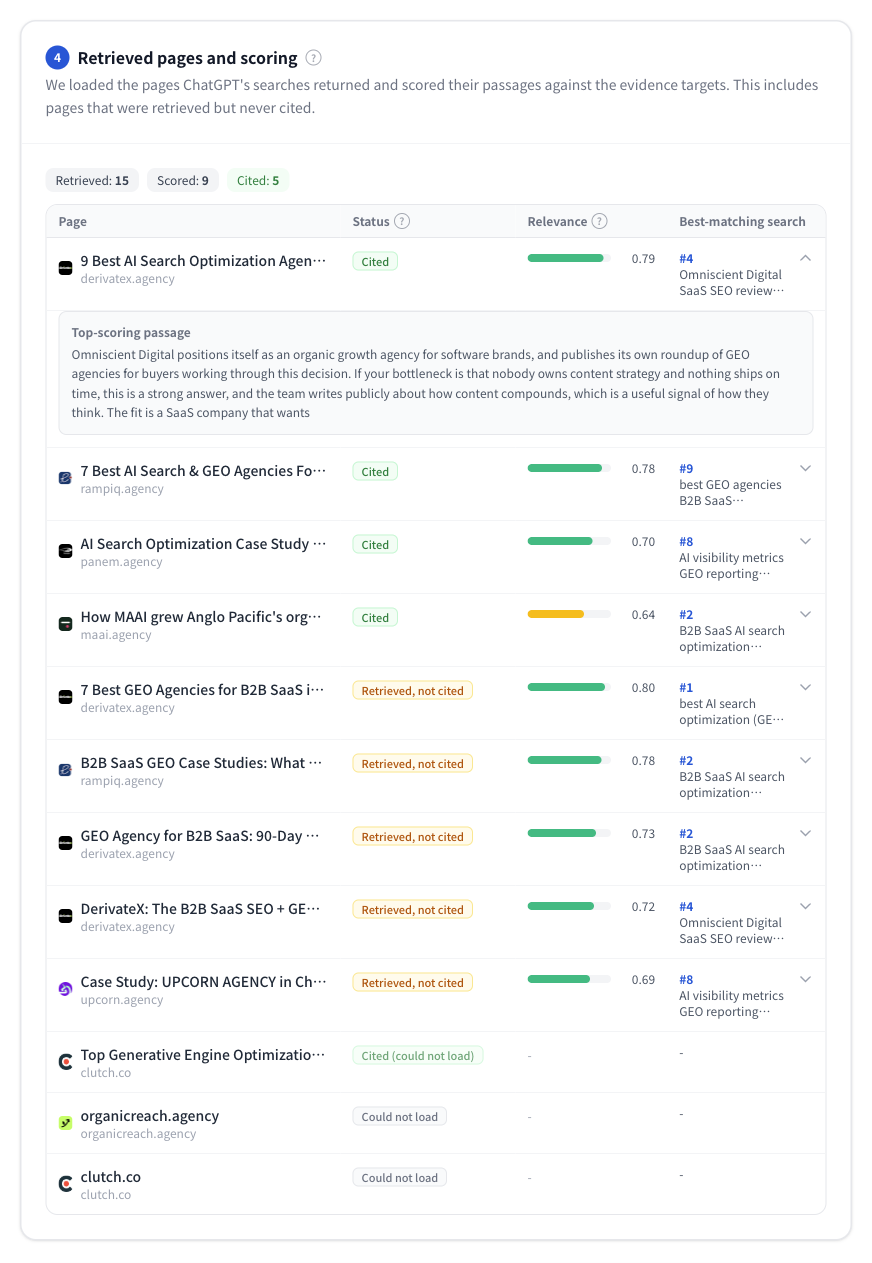
Figure 6 | Retrieved pages and evaluation. Each page is labeled “Cited,” “Retrieved, not cited,” or “Could not load.”
When you expand a row, you can see the chunks with high relevance and where the brand was mentioned on the page. The key is not simply adding keywords, but checking whether “the evidence required for that question is explicitly stated in the text.”
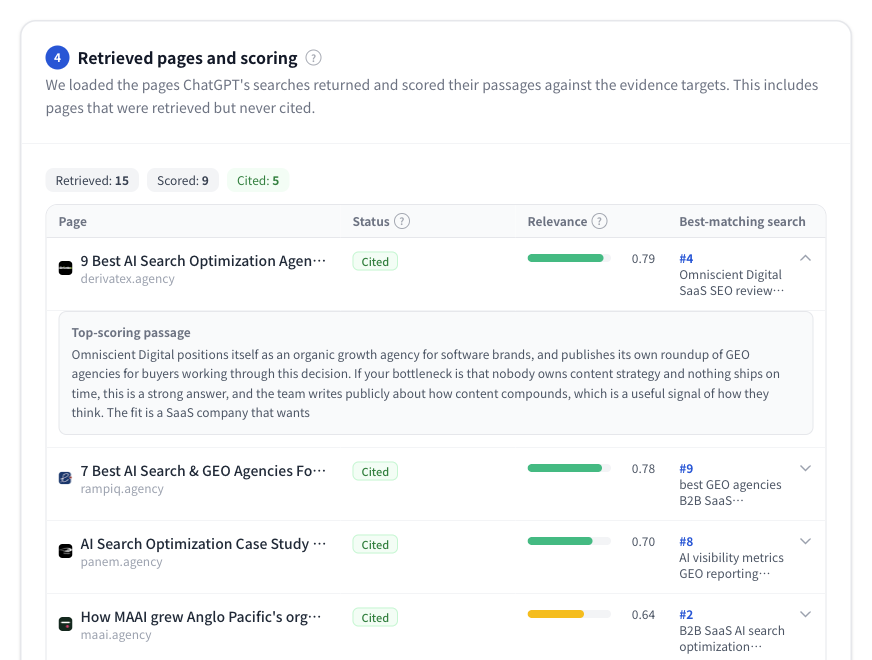
Figure 7 | Page details. You can see which parts were close to the search intent at the body-text chunk level.
If you want to learn more about how chunks and citations relate, see our explainer, “How Chunks and Citations Work.”
New feature 6: Diagnose where your company dropped out with the “brand funnel”
When you enter a brand name and domain, the tool lists five stages: “draft answer → search queries → retrieved pages → cited → final answer.” It checks whether the brand was found at each stage and diagnoses where the information flow broke. A key feature is that it checks not only your own site, but also mentions on third-party sites such as comparison articles and reviews.
In the example below, umoren.ai does not appear at any stage, so the diagnosis is “Missing before search started”: the model does not associate the brand with the question, and no search surfaced it. In other runs you may see a brand that is retrieved and cited but still missing from the final answer (“Cited, but not named in the answer”), which shows that earning a citation does not automatically lead to a recommendation.
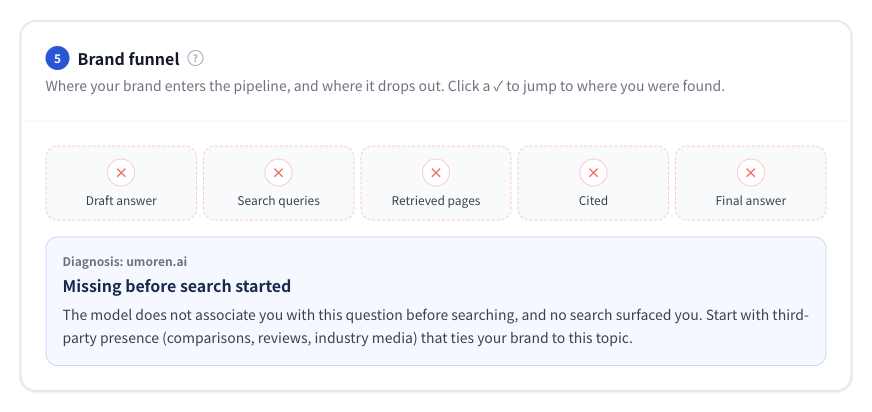
Figure 8 | Brand funnel. Shows at which of the five stages your brand was found and diagnoses where it dropped out.
Five diagnosis patterns, connected to next actions
|
Brand status |
What to check / improvement direction |
|---|---|
|
Missing before search started |
Check whether comparison articles, third-party media, and similar sources contain information that communicates the relationship between your company and the target theme. |
|
Not retrieved |
Check whether pages on pricing, comparisons, track record, and service descriptions that match the actual QFO are published and discoverable. |
|
Retrieved, then lost |
Compare top chunks against the Evidence target and fill gaps in conditions, figures, and supporting evidence. |
|
Cited, but not named in the answer |
Check whether the cited page clearly explains your company’s value proposition, fit criteria, and proper nouns. |
|
In the final answer |
Check whether the description is accurate and whether the brand is positioned as intended, then maintain the referenced information. |
New feature 7: Compare “candidate company turnover” between the pre-search and final answers
Finally, the tool compares the brands and products listed in the pre-search answer with the actual final answer. It organizes them as “Kept,” “Dropped,” and “Added,” so you can see whether a company that was a candidate before search disappeared from the final answer, or whether new candidates were added through search.
This change is a comparison between the pre-search answer simulation and the observed final answer. It does not mean that the model’s hidden internal views have been directly read.
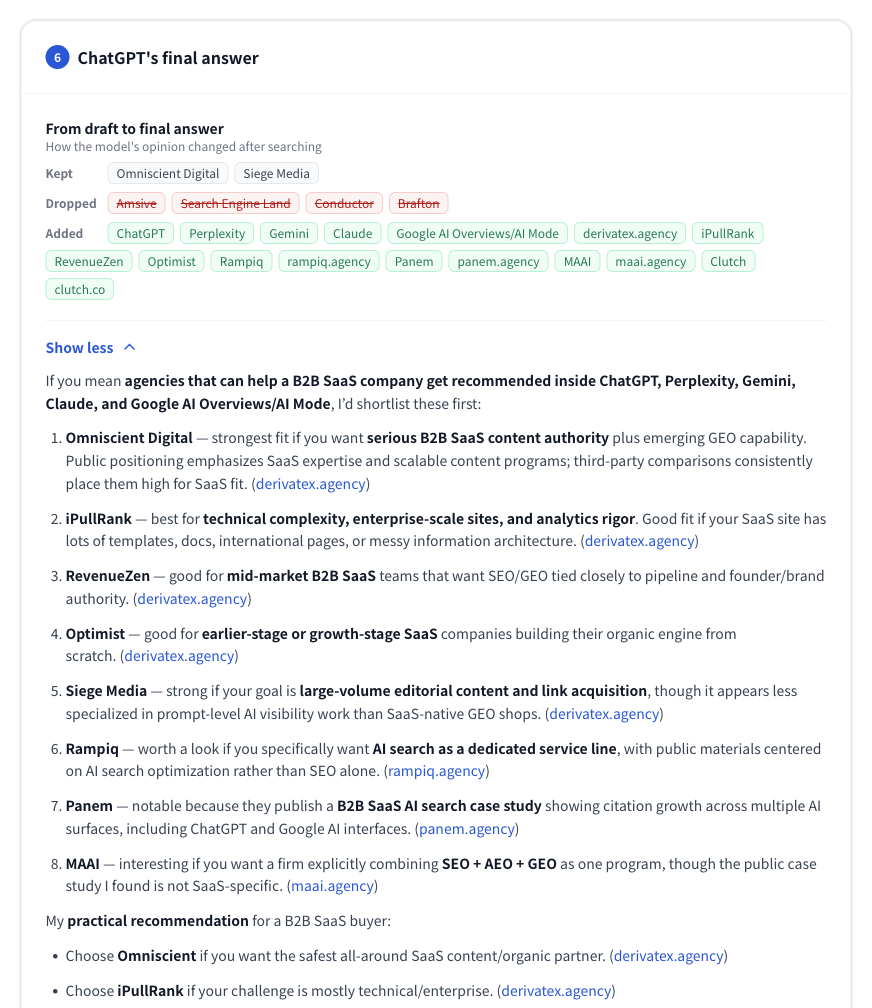
Figure 9 | Differences between pre-search candidates and the final answer. You can review “Dropped” and “Added” brands at a glance (top of screen).
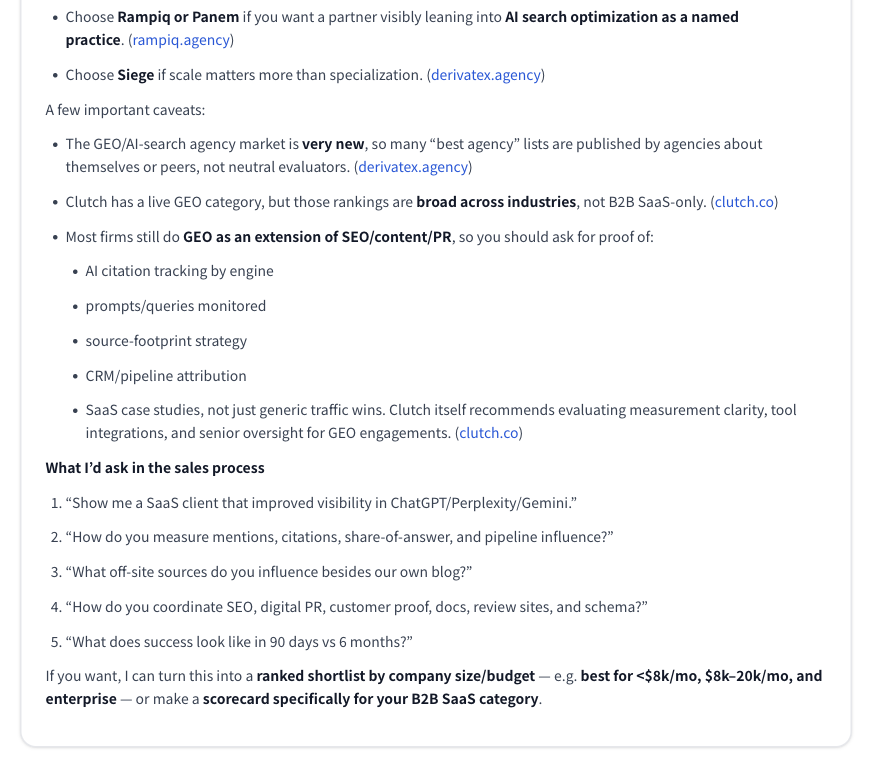
Figure 10 | You can also review the final answer and interpret the reasons for recommendation, including cited sources (bottom of screen).
Why you cannot improve by looking only at the final answer
Prompt tracking is important for understanding brand mention rate and visibility. However, the result “our company name did not appear” alone can make it difficult to tell whether the issue is discovery, information quality, or association with the brand.
This tool lets you break the process down by stage: whether your brand was included as a candidate before search, whether pages were retrieved in search, which text was evaluated after retrieval, and whether your company name remained even after citation.
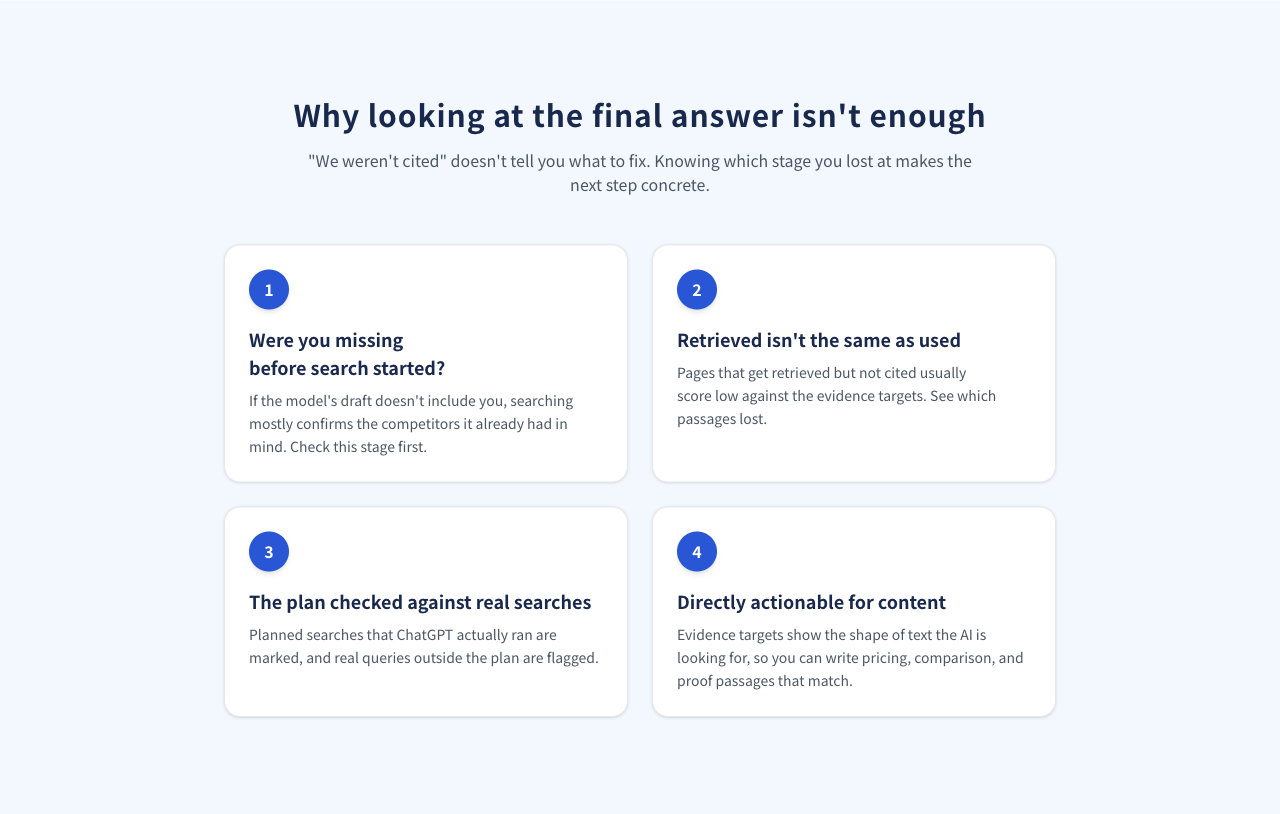
Figure 11 | Four issues that cannot be understood from the final answer alone. Broken down into pre-search, retrieval, plan matching, and content design.
Practical ways for web managers and LLMO teams to use it
1. Identify why competitors are recommended but your company is not
First, enter a question a customer would naturally ask without including your company name, and register your own brand as well. Check where your company appears across the pre-search answer, actual search, retrieved pages, citations, and final answer. The actions you should prioritize will differ depending on whether there are few mentions on third-party sites or your own page was retrieved but not selected.
2. Work backward from the Evidence target to identify the content you need
Check the form of information required by the search plan, such as “pricing range,” “target companies,” “comparison criteria,” and “implementation track record.” If existing content lacks the answer, it is easier to verify improvements by creating independent paragraphs that clearly state conditions, targets, numbers, and sources rather than adding more abstract language.
To check which aspects of a question a specific URL answers, you can also use the AI Search Content Audit. The recommended workflow is to identify search intent with QFO analysis, then use the content audit to inspect page-level gaps.
3. Compare search differences by persona and region
Run the same question with different user profiles, such as “SMB owner” and “enterprise head of marketing,” and compare the search terms, retrieved sources, and final answers. You can also see differences by search region, such as Japan and the United States. However, AI search results vary by time, environment, and context, so it is important not to judge performance based on a single analysis. Combine multiple observations with actual user behavior.
If you also want to compare Gemini search queries, see the Gemini Query Fan-Out Analyzer and the usage guide.
How much can you use for free? CSV export is also supported
You can start an analysis for free. Even first-time unregistered users can see the first parts of the research plan, actual queries, retrieved page evaluation, and an overview of the brand funnel. Detailed results can be viewed either by creating a free account or by entering company information to view the current result. The latter requires information such as a company email address.
When you unlock all results, you can review the search plan, matching results against executed queries, retrieved page evaluation, brand diagnosis, and final answer. The CSV includes the search type, claims to verify, search reason, Evidence target, match level with actual searches, related retrieved pages and evaluations, and more. It can be used for prioritizing actions and sharing findings internally.
The estimated analysis time is about 30–60 seconds (processing time may vary depending on conditions).
Notes for interpreting analysis results correctly
|
Read “observed measurements” and “simulation” separately Observed measurements: web search queries by ChatGPT, URLs retrieved through search, cited sources, final answer. Tool-side evaluation: chunking of retrieved page body text and relevance calculation. Simulation: pre-search answer, claims to verify, research plan, Evidence target. |
This tool does not directly obtain ChatGPT’s private intermediate reasoning or internal scores. It is designed to let you check the relationship between estimation and observation by matching the estimated search plan against actual search queries. Also, not all retrieved pages can necessarily be loaded and scored; evaluation is performed on pages that can be loaded. High relevance does not guarantee future search rankings or citations.
For the basic site design that underpins content improvement, you can also review “How to Build a Site That ChatGPT Cites and Recommends.”
Frequently asked questions (FAQ)
Q. What is query fan-out?
It is the process in which AI runs multiple related searches to gather the information needed to answer a single question. The search queries are not always the same words as the original question you entered.
Q. Are the pre-search answer and research plan ChatGPT’s internal data itself?
No. They are estimated results recreated with a separate model, not a direct view into private internal reasoning. By contrast, the search queries that were actually executed and the final answer are obtained from the target search execution.
Q. Can I use the Evidence target (HyDE) as-is in an article?
It can help you think through the structure of the text and the information required, but specific numbers and achievements included in the hypothetical evidence text need to be verified. Replace them with official data, case studies, and primary information before publishing.
Q. What happens when ChatGPT does not run a web search?
In cases where ChatGPT answers without conducting a web search, actual search queries are not obtained. However, by reviewing the simulated pre-search answer and plan, you can examine how that question and your company are associated.
Q. Is “retrieved but not cited” a failure?
Not necessarily. Even if a page was found in search, evidence from another page may have been prioritized for the purpose of the answer. Check the specificity of the page body, the freshness of the information, comparison criteria, and other factors, then improve the necessary areas first.
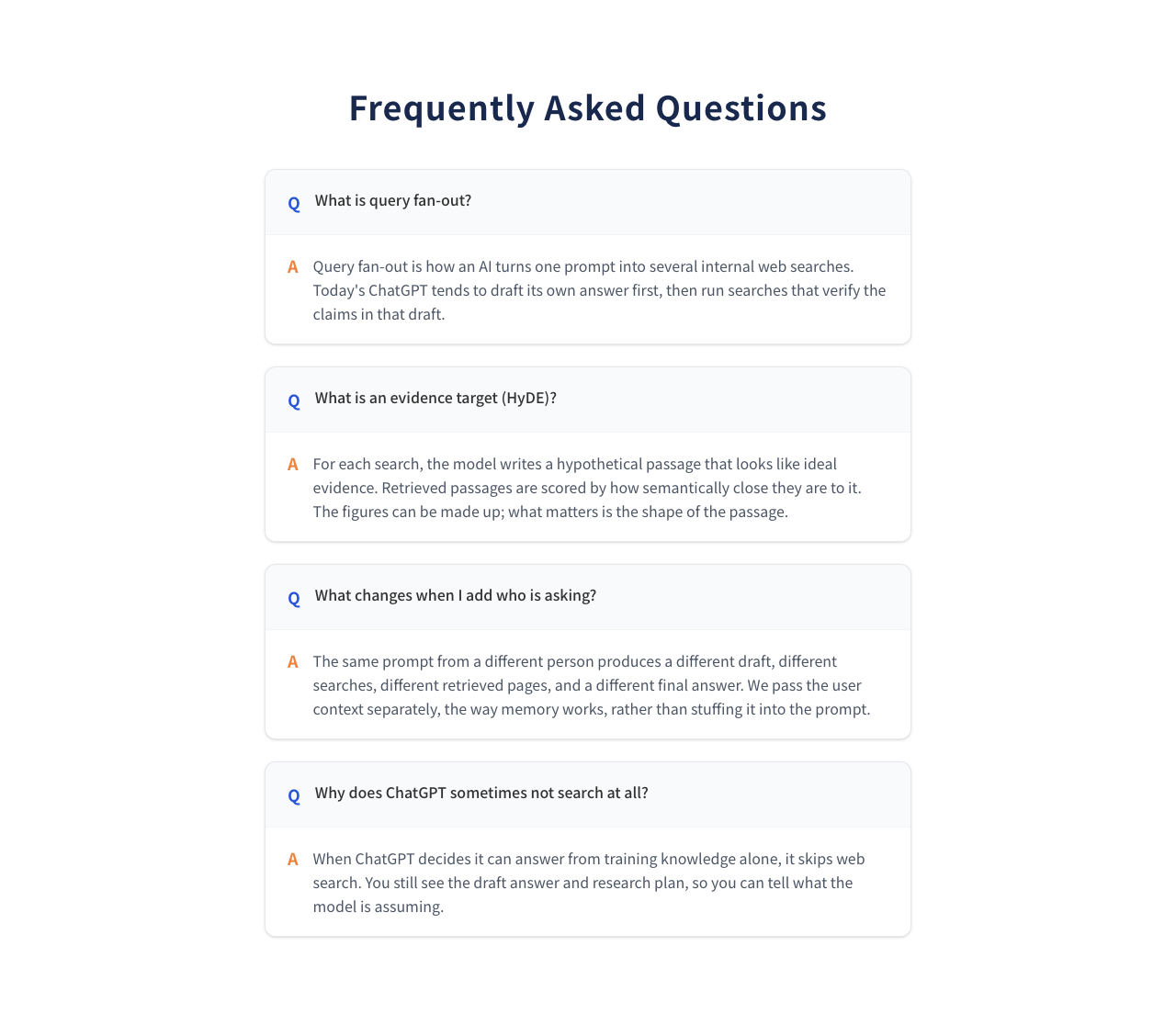
Figure 12 | You can also review FAQs about QFO, Evidence target, personas, and cases where search is not executed within the tool page.
Summary: Turn “why we did not appear” in AI search into actionable improvement data
The ChatGPT Query Fan-Out Analyzer has evolved from a tool for investigating search queries into an analysis tool for understanding AI search answer formation by stage. By looking at pre-search candidates, actual searches, retrieved page evaluation, where your brand appears, and differences in the final answer together, you can make your next actions more concrete.
Start by entering one question your customers are likely to ask and try the ChatGPT Query Fan-Out Analyzer.
If you want to approach AI search optimization more systematically, you can also view umoren.ai’s AI search optimization consulting and implementation and verification case studies. You can also discuss your company’s search, citation, and recommendation status through a free consultation.
See How AI Search Sees Your Company
Request a free current-state analysis report, delivered within 24 hours